Studio 2.3 - New Hidden Upsell Step For Regular Giving 🚀

Sorry, we didn't find any relevant articles for you.

Send us your queries using the form below and we will get back to you with a solution.

Manual Payments

Topics on Manual Payments

How do I add Campaign/Appeals to Manual Payments?

To enable the selection/entry of Campaigns for Manual Payment Entry. From the Mer ...

To enable the selection/entry of Campaigns for Manual Payment Entry.

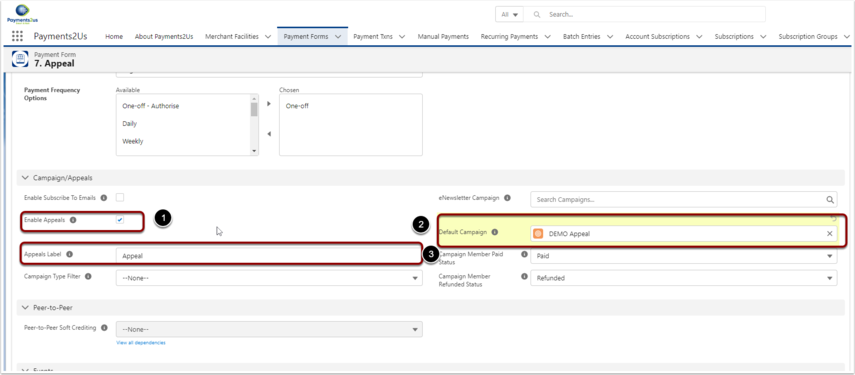
  • From the Merchant Facility, locate the related Payment Form you are using
  • Check the "Enable Appeals" field (1)
  • Optionally, enter a default Campaign if you would like the Campaign pre-populated
  • Optionally, change the Label for the Campaign Entry field
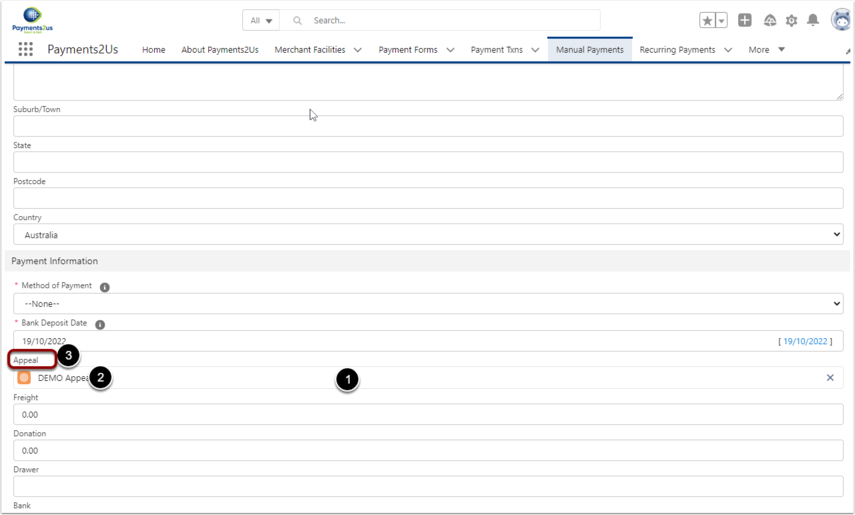
  1. After enabling, the Campaign / Appeal Will be available for entry on Manual Payment entry
  2. If the Default Campaign was entered, it will automatically be populated
  3. The "Appeals Label" will be shown as the field entry label.
Custom Lookup Fields not working on the Manual Payments Page

If a Custom Lookup Field on the Manual Payments page does not return search resul ...

If a Custom Lookup Field on the Manual Payments page does not return search results, the related Object API Name and Field API Name may not have been added to the allow list.

To resolve this issue, please review Step 4: Adding Custom Lookup Fields in the How to Add or Change Fields on Manual Payments help article.